Table of Contents
ToggleIntroduction
Choosing phone accessories for a business team is not simply a matter of deciding whether wireless technology is newer or more convenient. Instead, IT managers, procurement teams and business owners need to consider how employees actually work.
A call centre agent who stays at one desk for eight hours has different needs from a manager who moves between meetings. Likewise, a remote employee may benefit from wireless connectivity, while a large fixed office may save money and simplify support with wired equipment.
In simple terms, wired accessories prioritise simplicity, continuous availability and predictable connectivity, while wireless accessories prioritise mobility, flexibility and reduced cable clutter.
Therefore, the right choice is usually not one-size-fits-all.
Table of Contents
- Introduction
- What Are Wired and Wireless Phone Accessories?
- Wired vs Wireless at a Glance
- Benefits and Disadvantages of Wired Accessories
- Benefits and Disadvantages of Wireless Accessories
- Which Is Better for Call Centres?
- Wired vs Bluetooth vs DECT
- Why Microphone Quality Matters
- How to Choose Accessories for Different Employees
- Cost, Compatibility and Procurement
- Common Buying Mistakes
- Best Practices for Business Deployment
- Future Trends in Business Phone Accessories
- Conclusion
- FAQs
What Are Wired and Wireless Phone Accessories?
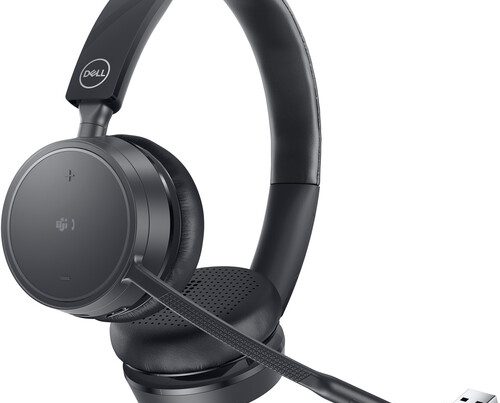
Wired phone accessories connect to a phone, computer or communication system through a physical connection such as USB, USB-C, 3.5mm or a professional telephony connection. Wireless accessories use technologies such as Bluetooth, DECT or a dedicated wireless receiver instead. Both can support professional business communication when the correct product is selected.
For businesses, phone accessories can include headsets, headphones, charging equipment, adapters, cables, power banks and other devices that support mobile communication.
However, headsets are particularly important for teams that spend significant time on calls. They affect how employees communicate with customers, colleagues and clients throughout the working day.
Microsoft, for example, maintains a certification programme for business peripherals such as headsets. Certified devices are tested for factors including audio quality, compatibility and integration with Microsoft Teams.
Why the distinction matters
A wireless accessory can offer freedom that a cable cannot. On the other hand, a wired accessory removes the need to manage a battery.
Consequently, procurement teams should start with the employee’s workflow rather than the accessory’s marketing features.
Wired vs Wireless at a Glance
The simplest way to compare wired and wireless accessories is to look at what the employee needs during a normal workday. Wired products generally make fixed workstations easier to manage, while wireless products become more valuable as mobility increases.
Feature | Wired | Wireless |
Physical connection | Yes | No |
Battery required | No | Usually |
Charging | Not required | Required |
Mobility | Limited | High |
Cable clutter | Possible | Minimal |
Setup | Usually simple | Pairing or receiver may be required |
Fixed desk work | Excellent | Excellent |
Hybrid work | Good | Excellent |
Multi-device use | Model dependent | Often convenient |
Large deployment | Simple to standardise | Requires charging plan |
Walk-and-talk calls | Limited | Excellent |
Maintenance | Generally simple | Battery and connectivity management |
The short answer
Choose wired accessories when reliability, simplicity and continuous use matter most. Choose wireless when employee mobility and flexible device use matter more.
For many organisations, a combination of both is the most sensible solution.
Benefits and Disadvantages of Wired Accessories
Wired accessories remain highly relevant in business environments because they remove several variables from daily use. There is no wireless pairing process, and a wired headset does not suddenly stop working because its battery is empty.
Benefits of wired accessories
- No battery management
A wired headset can remain available throughout a long shift without requiring a charging routine.
That can be especially useful for call centres where employees handle calls continuously.
- Simple deployment
USB headsets can generally be connected directly to a computer. Therefore, IT teams can often deploy them with fewer wireless pairing issues.
- Predictable connectivity
Because the headset has a physical connection, it does not depend on maintaining a wireless link between the headset and computer.
- Practical for large teams
When an organisation needs to equip dozens or hundreds of fixed workstations, straightforward wired equipment can make procurement and replacement easier.
- Strong value at different price points
Wired business headsets are available across a broad range of prices. Promallshop’s current catalogue, for example, includes models such as the Logitech H110, Logitech H390 and Logitech H570e.
Disadvantages of wired accessories
The biggest drawback is mobility.
An employee cannot simply walk away from the workstation while remaining connected unless the particular setup provides enough cable length or another connection method.
Additionally, cables can contribute to desk clutter. For employees who regularly move between rooms, desks or meeting spaces, that limitation can become frustrating.
Best fit: fixed call-centre agents, receptionists, administrative employees and other users who spend most of the day at one workstation.
Benefits and Disadvantages of Wireless Accessories
Wireless accessories remove the physical cable between the user and the connected device. As a result, they can be particularly useful for hybrid employees, executives, supervisors and mobile workers.
Benefits of wireless accessories
- Freedom of movement
A wireless headset can allow an employee to leave the desk while remaining connected, provided the connection range supports the movement.
For example, a supervisor could continue a call while walking around a call-centre floor instead of removing the headset.
- Less cable clutter
Removing the cable can make workstations easier to manage.
This becomes even more useful in flexible offices where employees frequently change desks.
- Better support for hybrid work
Remote employees often move between laptops, phones and different workspaces. A suitable wireless headset can make that workflow more convenient.
- Multi-device connectivity
Some business wireless headsets support more than one device. This can help employees who use a laptop and smartphone during the same workday.
- Useful for mobile roles
Managers, sales teams, supervisors and other employees who rarely stay at one desk can gain more practical value from wireless technology.
Disadvantages of wireless accessories
Wireless products introduce battery management.
If an employee forgets to charge a headset, that can become a problem during an important meeting or customer call. Moreover, wireless deployments require IT teams to consider pairing, range, compatibility and charging.
Therefore, wireless should not be selected simply because it appears more modern.
Best fit: executives, supervisors, hybrid workers, remote employees and teams that regularly move around during calls.
Which Is Better for Call Centres?
For call centres, the better headset depends on whether agents remain at fixed workstations or need to move during calls. Wired headsets are often practical for fixed agents, while wireless models can be more useful for supervisors, mobile agents and flexible work environments. In both cases, microphone quality and comfort should be priorities.
When wired makes sense
A wired call centre headset is a strong choice when:
- Agents remain at assigned desks.
- Employees work long shifts.
- Battery charging would create unnecessary work.
- IT wants simple deployment.
- The organisation needs to equip many workstations.
- Employees mainly use desktop computers or desk phones.
A headset with a microphone designed for voice communication is particularly important in busy environments.
When wireless makes sense
A wireless call centre headset can be useful when:
- Employees move around during calls.
- Supervisors walk around the floor.
- Workers use multiple devices.
- Employees work from home or in hybrid environments.
- The organisation uses flexible workstations.
- Cable-free movement improves productivity.
Current call-centre headset collections in Nigeria include both wired and wireless options, including USB, QD, Bluetooth and DECT solutions.
What about working from home?
For remote workers, there is no universal winner.
A best headset for call centre work from home should have a clear microphone, comfortable fit and reliable connectivity. Wireless can provide additional freedom, although a wired USB headset may be simpler for employees who spend the entire day at one desk.
Therefore, ask one simple question first:
Does this employee actually need to move while on a call?
If the answer is no, wireless mobility may not justify the additional complexity.
Wired vs Bluetooth vs DECT
Bluetooth and DECT are both wireless technologies, but they are not interchangeable in every business environment. Bluetooth is particularly convenient for laptops and mobile devices, while DECT is commonly used for professional cordless telephony where dedicated wireless communication is important.
Bluetooth headsets
Bluetooth is well suited to:
- Smartphones
- Laptops
- Tablets
- Hybrid work
- Remote work
- Video meetings
- Multi-device workflows
Modern business headsets can also use USB receivers to simplify computer connectivity.
Microsoft’s current certified-device listings include both Bluetooth and USB-connected business headsets, including products from Logitech, Dell, Jabra and Yealink.
DECT headsets
DECT is commonly associated with professional cordless telephone systems.
For a call-centre or enterprise environment, DECT can therefore be worth considering when range and dedicated business telephony are important.
The key point is that wireless does not automatically mean Bluetooth.
USB wireless receivers
Some wireless headsets use a USB receiver or dongle.
This can provide a straightforward connection to a computer without relying entirely on the computer’s built-in Bluetooth.
As a result, procurement teams should compare the complete connection method rather than simply asking whether a headset is wireless.
Why Microphone Quality Matters
Microphone quality is one of the most important features when buying a business headset because the person on the other end of the call needs to hear the employee clearly. A headset’s ANC feature and its microphone noise cancellation also solve different problems, so buyers should evaluate them separately.
ANC vs microphone noise cancellation
Technology | Primary purpose |
ANC | Reduces surrounding sound heard by the wearer |
Noise-cancelling microphone | Reduces unwanted background sound transmitted to the listener |
Voice processing | Helps improve speech clarity |
Acoustic protection | Helps protect the user from excessive or sudden audio |
Consider a call-centre agent working beside ten other agents.
The agent may be able to hear surrounding conversations. More importantly, the customer may also hear those conversations if the microphone does not handle background noise effectively.
Therefore, when searching for a call center headset with mic noise cancelling, focus specifically on microphone performance rather than assuming that every product advertised as “noise cancelling” will deliver the same result.
Promallshop and RapidBTS both list professional headsets designed around business calling, including models with noise-cancelling microphones and wireless options.
How to Choose Accessories for Different Employees
The best procurement strategy is usually role-based. Instead of giving every employee the same headset, divide the team according to how and where they communicate.
Fixed call-centre agents
Recommended direction: Wired or specialised wireless
Prioritise:
- Noise-cancelling microphone
- Comfort
- Durability
- Clear voice transmission
- Simple controls
- Reliable connectivity
Supervisors and team leaders
Recommended direction: Wireless
Mobility can be more valuable because supervisors may move between desks while handling calls.
Executives and managers
Recommended direction: Wireless
Executives often move between meetings and devices. Multi-device connectivity can therefore be particularly useful.
Remote workers
Recommended direction: Wired USB or Bluetooth wireless
The decision depends mainly on whether the employee needs mobility.
General office employees
Recommended direction: Wired or wireless
If calls are occasional, an expensive premium headset may not be necessary.
Procurement snapshot
Employee | Priority | Likely choice |
Call-centre agent | Reliability + microphone | Wired |
Call-centre supervisor | Mobility | Wireless |
Executive | Mobility + multi-device use | Wireless |
Remote employee | Flexibility | Either |
Receptionist | Voice clarity + simplicity | Wired |
IT support | Compatibility + standardisation | Wired/Wireless mix |
Cost, Compatibility and Procurement
The purchase price is only one part of the cost of business phone accessories. Procurement teams should also consider compatibility, replacement parts, warranty, support, charging infrastructure and the time required to deploy and maintain the equipment.
How much should a business spend?
There is no universal business headset price.
Current Promallshop listings illustrate the range available in Nigeria. For example, listed products include the Logitech H110 at around ₦12,600, Logitech H390 at around ₦48,000, VT6200UNC-D at around ₦58,000, Logitech H570e at around ₦107,100, Logitech H800 at around ₦157,500 and Dell WL5022 at around ₦435,000. Prices and promotions can change, so these should be treated as catalogue examples rather than permanent market prices.
Rather than giving every employee the same budget, consider three groups:
Entry-level: basic office calls and occasional meetings.
Mid-range: employees who spend significant time on calls and need stronger comfort and microphone performance.
Premium: executives, heavy call users, mobile employees and specialised business environments.
Check compatibility before buying
This step is easy to overlook.
Before placing a bulk order, identify whether employees use:
- Windows PCs
- Mac computers
- Smartphones
- IP phones
- USB-A
- USB-C
- RJ9
- QD connections
- Bluetooth
- Microsoft Teams
- Other VoIP or UC platforms
A headset that works perfectly with one device may not offer the same functionality on another.
For Microsoft Teams users, checking certification is particularly useful. Microsoft’s certification programme tests compatible peripherals for areas including audio quality, reliability and integration.
Common Buying Mistakes
Businesses often make headset purchasing decisions based on specifications instead of the actual work employees perform. That can lead to unnecessary spending or equipment that creates new support problems.
Buying only on price
The cheapest headset is not always the cheapest option over its useful life.
If a product is uncomfortable, unreliable or poorly suited to the environment, frequent replacement can quickly reduce the original saving.
Buying only on brand
Logitech, VT and Dell all offer business-focused products, but different models are designed for different requirements.
For example, Logitech’s current business range includes both wired and wireless models, including headsets designed around noise-cancelling microphones and business platforms.
Therefore, choose the model based on the role first and the brand second.
Confusing ANC with microphone noise cancellation
This is one of the most common mistakes.
ANC primarily helps the wearer hear less surrounding noise. Microphone noise cancellation helps the other person hear the employee more clearly.
For customer service teams, the second feature can be especially important.
Buying wireless without a charging plan
Wireless headsets require a basic charging strategy.
For a larger deployment, determine:
- Where employees will charge them.
- When charging should happen.
- What happens if a battery is low.
- Whether spare units are available.
- How failed batteries will be handled.
Ignoring employee comfort
A headset can have excellent technical specifications and still be a poor choice if employees dislike wearing it.
For long shifts, test:
- Weight
- Ear-cup pressure
- Headband comfort
- Microphone position
- Mono versus stereo design
- Adjustability
Best Practices for Business Deployment
A good procurement process should make the equipment easier to manage after purchase, not just easier to buy.
1. Group employees by role
Create categories such as call-centre agents, managers, executives and remote workers.
2. Identify the actual devices
Record the computer, phone and communication platform used by each group.
3. Define must-have features
For example:
- Noise-cancelling microphone
- USB-C
- Bluetooth
- Wireless receiver
- Multi-device support
- Comfortable design
- Long battery life
- Platform certification
4. Test before bulk purchasing
Give representative employees a small number of shortlisted models.
Test them during actual calls rather than simply testing music playback.
5. Standardise where practical
Using one or two approved models can simplify:
- IT support
- Procurement
- Training
- Replacements
- Troubleshooting
- Spare inventory
6. Keep a mixed strategy when necessary
Standardisation does not mean every employee must receive exactly the same product.
A business can standardise around two approved options: one wired model for fixed workstations and one wireless model for mobile roles.
That approach often provides a better balance between consistency and employee needs
Future Trends in Business Phone Accessories
Business phone accessories are increasingly being designed around hybrid work, multi-device communication, AI-assisted voice processing and simpler device management. However, these developments do not eliminate the need for basic procurement principles such as compatibility, comfort and role-based selection.
Current business headset ranges already show the direction of the market. Logitech, for example, lists wired and wireless business headsets with features such as adaptive ANC, noise-cancelling microphones, USB connectivity and wireless charging options.
Microsoft’s Teams ecosystem also continues to expand its range of certified wired, Bluetooth and wireless business peripherals.
However, more features do not automatically mean a better purchase.
A fixed call-centre employee may still be better served by a straightforward wired headset. Meanwhile, a mobile manager may gain substantial value from wireless connectivity.
The future is therefore less about replacing wired accessories entirely and more about matching the right technology to the way people work.
Key Takeaways
- Wired is usually better for fixed workstations.
- Wireless is better when mobility matters.
- Bluetooth and DECT serve different business requirements.
- ANC is not the same as microphone noise cancellation.
- Compatibility should be checked before bulk purchasing.
- Comfort matters for employees who wear headsets for hours.
- Businesses should consider total cost, not only purchase price.
- A mixed wired and wireless strategy can be more practical than choosing one for everyone.
Conclusion
Wired and wireless phone accessories both have a place in modern businesses.
Wired accessories are usually the practical choice for fixed workstations, long shifts, simple deployment and teams that do not need much mobility. Wireless accessories are more valuable when employees move around, switch between devices or work in hybrid environments.
For call centres, the decision should go beyond the wired-versus-wireless question. Microphone performance, comfort, compatibility, durability and maintenance can have just as much impact on the employee and customer experience.
Ultimately, the best approach for many businesses is a role-based combination of wired and wireless accessories.
Start by understanding how your team works. Then choose the technology that solves the actual problem rather than paying for features employees may never use.
For businesses in Nigeria, Ghana and Côte d’Ivoire, this approach can also make procurement more predictable because teams can standardise approved models while still giving different employee groups the connectivity they need.
For more guidance, see Promallshop’s resources on
FAQs
Neither is universally better. Wired accessories are usually better for fixed workstations because they do not require charging, while wireless accessories are more suitable for mobile, hybrid and flexible workers.
Yes. Wireless call centre headsets can be useful for supervisors, mobile agents and flexible workstations. However, battery life, range, microphone quality and compatibility should be checked before deployment.
The best call centre headset should provide clear voice transmission, a good noise-cancelling microphone, comfort, durability and reliable connectivity. The exact model depends on the phone or software platform being used.
A good remote call-centre headset should have a clear microphone, comfortable fit and dependable connectivity. Wired USB models are simple, while wireless models provide greater freedom of movement.
ANC primarily reduces surrounding sound heard by the headset wearer. A noise-cancelling microphone is designed to reduce unwanted background noise transmitted to the person listening to the call.