Table of Contents
ToggleIntroduction
A good work headset does more than let you hear the person on the other end of a call. It also determines how clearly they hear you. In a busy office, call centre, shared workspace or home office, background noise can quickly turn a simple conversation into a frustrating experience.
That is why noise-cancelling headsets have become an important part of modern workplace communication. They can reduce distractions for the wearer while helping the microphone focus more effectively on the speaker’s voice.
For businesses, however, choosing a headset should involve more than looking for the words “noise cancelling” on a product page. Connectivity, microphone performance, comfort, durability, compatibility and intended use all matter.
Table of Contents
- Introduction
- What Makes a Good Headset for Work?
- How Noise Cancellation Works in Business Headsets
- Headset Options for Work and Remote Meetings
- Wired vs Wireless Headsets for Business
- Features to Consider Before Buying
- Choosing a Headset for Different Work Environments
- How to Set Up a Headset for Better Meetings
- Common Headset Buying Mistakes
- Future Trends in Business Headsets
- Conclusion
- FAQs
What Makes a Good Headset for Work?
A good work headset should provide clear two-way communication, comfortable wearing, dependable connectivity and effective background-noise management. For professional environments, microphone performance is especially important because a headset that sounds good to the wearer can still perform poorly if colleagues or customers cannot hear the speaker clearly.
For most businesses, look for:
- A dedicated microphone
- Noise-cancelling microphone technology
- Comfortable ear cushions
- Adjustable headband
- USB, Bluetooth or compatible desk-phone connectivity
- Easy mute and volume controls
- Good microphone positioning
- Reliable build quality
- Compatibility with workplace communication platforms
- Appropriate battery life for wireless models
The right choice depends heavily on how the headset will be used.
A customer service representative who spends eight hours handling calls has different requirements from an executive who joins three video meetings a day.
Likewise, someone working in a quiet home office may not need the same microphone technology as an agent sitting beside 30 other call centre employees.
Why the microphone matters
Many buyers focus heavily on what they can hear. However, workplace communication is a two-way process.
A headset microphone should capture the user’s voice while reducing unwanted sounds such as:
- Nearby conversations
- Keyboard noise
- Fans
- Air conditioning
- Traffic
- Household activity
- Other employees speaking nearby
This is particularly important for call centres and open-plan offices.
How Noise Cancellation Works in Business Headsets
Noise cancellation is not one single technology. In business headsets, it can refer to passive isolation, active noise cancellation or microphone-based noise reduction. ANC primarily helps the wearer hear more clearly, while a noise-cancelling microphone helps the other person hear the speaker more clearly.
Active Noise Cancellation vs microphone noise cancellation
These two features are often confused.
Active Noise Cancellation (ANC) works primarily on the sound reaching the headset wearer. It uses microphones and processing to reduce surrounding ambient sounds.
Microphone noise cancellation, on the other hand, is designed to improve what the person on the other end of the call hears.
For example, imagine an employee working beside an air conditioner.
ANC can make the air conditioner less distracting to the employee.
Microphone noise cancellation can help reduce the amount of that background sound picked up during the employee’s call.
Both technologies can be useful, but they solve different problems.
Passive noise isolation
Passive isolation comes from the physical construction of the headset. Ear cushions and the shape of the ear cups help reduce external sound entering the ears.
It does not require electronic processing.
For many office workers, a combination of good ear-cup design and electronic noise management provides a better overall experience.
Why this distinction matters for call centres
For a call centre manager, microphone performance can be more important than ANC.
The agent needs to hear the customer clearly, but the customer also needs to hear the agent without constant background chatter.
That makes a call centre headset with mic noise cancelling particularly useful in high-density work environments.
Headset Options for Work and Remote Meetings
The best headset depends on the user’s environment, workload and required connectivity. Promallshop’s current catalogue includes wired USB models, wireless Bluetooth options and business-oriented headsets from brands including Logitech, Dell and VT. The range includes options such as the Logitech H390, Logitech Zone Wireless UC, Dell WL5022, VT FLOW and VT6200UNC-D. [1]
Here is a practical comparison of the types and models currently represented in the catalogue:
Headset/model | Connection | Key consideration | Suitable environment |
Logitech H390 | USB | Noise-cancelling mic, plug-and-play | Office, remote work |
Logitech Zone Wireless UC | Wireless | Mobility and noise management | Hybrid work, executives |
Dell WL5022 | Wireless | Business wireless connectivity | Corporate offices |
VT 6300 | USB | Dual noise-cancelling microphones | Office and call centre |
VT6200UNC-D | USB | Two-microphone design | Call centres |
VT FLOW | Wireless Bluetooth | ANC and hybrid-work focus | Remote/hybrid work |
VT9800 | Wireless Bluetooth | Dual connectivity | Business users |
Product availability and pricing can change, so businesses should confirm the current specification and price before procurement.
Logitech headsets
Logitech has a broad range of workplace headsets.
The Logitech H390 is a straightforward example of a wired business headset. Logitech describes it as a USB headset with a noise-cancelling microphone, inline controls and a rotating boom microphone. [2]
For organisations that want wireless connectivity, the Logitech Zone range moves into a more advanced business category.
Logitech’s Zone Wireless 2, for example, uses multiple noise-cancelling microphones and hybrid ANC, demonstrating how modern business headsets increasingly combine microphone processing with active noise management. [3]
Dell headsets
Dell headsets can be particularly relevant for organisations that already standardise their computing hardware around Dell systems.
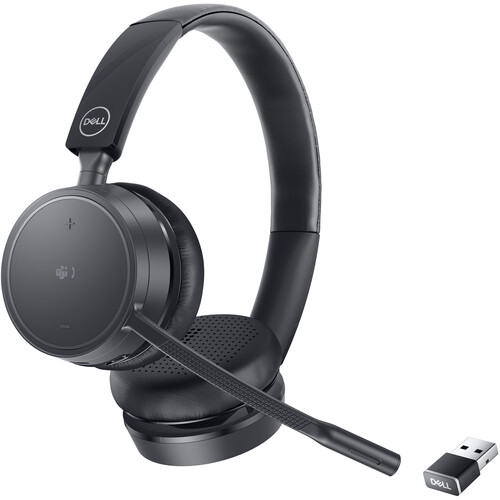
The Dell WL5022 is currently listed in Promallshop’s wireless headset catalogue, making it an option worth considering for businesses looking for a wireless business headset. [4]
However, procurement teams should always verify the exact model’s compatibility with their computers, communication platforms and existing IT environment.
VT call centre headsets
VT headsets are particularly relevant to environments where microphone noise reduction is a major requirement.
Promallshop’s catalogue includes models such as the VT 6300 and VT6200UNC-D, as well as wireless models such as VT FLOW and VT9800. [1]
For a call centre, the focus should not simply be on whether a headset is wireless. The more important questions are whether the microphone performs well in a noisy environment, whether agents can comfortably wear it throughout their shift and whether the connection works reliably with the organisation’s telephony system.
Wired vs Wireless Headsets for Business
Wired headsets are usually easier to deploy and maintain at fixed workstations, while wireless headsets provide greater freedom of movement. Neither connection type is automatically better for every business. The correct choice depends on mobility requirements, workstation design, device compatibility, battery management and the communication platform being used.
Wired headsets
Wired models remain popular in offices and call centres because they are simple.
A USB headset can often be connected directly to a computer without pairing or charging.
Advantages include:
- No battery charging
- Stable physical connection
- Simple deployment
- Low maintenance
- Easy replacement
- Suitable for fixed desks
For high-volume call centres where agents remain at their desks, this simplicity can be valuable.
Wireless headsets
Wireless headsets provide greater freedom.
An employee can move away from the desk, walk around during a call or switch between work activities without being physically connected to the computer.
They are especially useful for:
- Executives
- Managers
- Hybrid workers
- Remote employees
- Employees who move between rooms
- People who regularly switch between devices
However, wireless headsets introduce another procurement consideration: battery management.
A headset that runs out of battery during an important meeting creates a problem that simply does not exist with a wired model.
Bluetooth vs USB
Bluetooth is useful when mobility and device flexibility matter.
USB is often preferable when an organisation wants a predictable, plug-and-play connection to computers.
Some business headsets provide both options, allowing users to connect wirelessly while retaining a wired connection when required.
Features to Consider Before Buying
The right headset should be selected according to the work environment rather than marketing terminology alone. Procurement teams should evaluate microphone quality, noise management, comfort, connection type, platform compatibility, battery life, durability and support. For large deployments, standardising compatible models can also simplify support and replacement.
1. Microphone quality
For meetings and customer service, microphone quality should be near the top of the checklist.
A microphone positioned close to the user’s mouth can provide better voice capture than a microphone positioned farther away.
Noise-cancelling microphone technology can further help reduce unwanted background sounds.
2. Comfort
A headset may be technically impressive but still unsuitable if employees cannot comfortably wear it for several hours.
Look for:
- Adjustable headbands
- Soft ear cushions
- Reasonable weight
- Comfortable clamping pressure
- Flexible microphone boom
- Breathable materials where appropriate
For call centres, comfort becomes even more important because headset use can occupy most of an employee’s shift.
3. Connectivity
Before purchasing, identify what employees actually use.
For example:
- Laptop: USB or Bluetooth
- Desktop: USB
- Smartphone: Bluetooth
- IP phone: RJ9, QD or manufacturer-compatible connection
- Softphone: USB/Bluetooth depending on system
Do not assume that every headset works with every desk phone.
4. Platform compatibility
Businesses using Microsoft Teams should pay attention to device certification and compatibility.
Microsoft explains that its Teams certification programme tests devices for areas including audio and video quality, user experience and security. [5]
Certified devices can also support useful physical controls such as answering calls, adjusting volume and muting or unmuting. [6]
Zoom also provides built-in noise suppression and echo cancellation, although its support documentation notes that users may adjust these settings for particular professional audio scenarios. [7]
5. Battery life
For wireless models, battery life should match the user’s workday.
Do not look only at the manufacturer’s maximum battery figure. Consider how employees actually work.
A headset used for occasional meetings does not require the same battery capacity as one used continuously for customer calls.
6. Durability
For a 50-person office, replacing a few headsets may not be a major issue.
For a 500-agent contact centre, it becomes a procurement concern.
Consider:
- Headband durability
- Cable quality
- Ear cushion replacement
- Microphone boom construction
- Warranty
- Availability of replacement accessories
Choosing a Headset for Different Work Environments
The most suitable headset depends on the environment in which it will be used. Quiet home offices, open-plan corporate offices, call centres and executive workspaces create different audio and mobility requirements. Instead of purchasing one model for every employee, businesses can create headset tiers based on job role and working conditions.
For call centres
Prioritise:
- Noise-cancelling microphone
- Comfort
- Durability
- Acoustic protection
- Reliable connection
- Easy mute controls
- Replaceable accessories
A call center headset with mic noise cancelling is particularly appropriate when several employees share the same space.
For remote workers
Remote workers may benefit from:
- Wireless connectivity
- ANC
- Bluetooth
- USB connectivity
- Good microphone pickup
- Comfortable ear cushions
- Multi-device connectivity
A wireless headset can be useful when an employee regularly moves between a laptop and smartphone.
For executives
Executives often benefit from a combination of:
- Wireless connectivity
- Professional microphone quality
- ANC
- Premium comfort
- Multi-device support
- Long battery life
The goal is usually flexibility rather than call-centre durability.
For open-plan offices
Open offices create two separate problems: the user needs to concentrate, and the microphone needs to avoid picking up unnecessary conversation.
Therefore, look for a headset with both effective listening-side noise management and microphone-side noise reduction.
For IT-managed organisations
IT managers should consider standardisation.
Instead of allowing employees to purchase completely different headsets, businesses can establish approved models based on:
- Operating system
- Communication platform
- Connection type
- Job role
- Support requirements
- Budget
This can reduce compatibility problems and make troubleshooting easier.
How to Set Up a Headset for Better Meetings
Even an excellent headset can perform poorly when it is configured incorrectly. Users should select the headset as their microphone and speaker, position the boom correctly, test their audio before important meetings and adjust application-level noise suppression when necessary. Good physical positioning and software configuration are therefore part of headset performance.
Connect the headset
Connect your USB headset or pair your Bluetooth headset with the computer.
Select the correct input
Open your meeting application and make sure the headset microphone is selected as the input devic]
Select the correct output
Choose the headset as the speaker or audio output.
Position the microphone
Place the microphone close enough to capture your voice clearly without putting it directly against your mouth.
Test the audio
Make a test call or use the platform’s audio test function.
Listen for:
- Echo
- Distortion
- Low microphone volume
- Background noise
- Intermittent connection
Check application settings
Microsoft Teams and Zoom both provide audio controls that can affect microphone performance. Make sure your headset and software settings are not working against each other. [Keep volume at a sensible level]
Noise cancellation should not be an excuse to increase volume excessively.
The World Health Organization recommends safe listening practices, including keeping volume down, taking breaks and using well-fitted noise-cancelling headphones where appropriate.
Common Headset Buying Mistakes
The most common headset buying mistakes include choosing by brand alone, confusing ANC with microphone noise cancellation, ignoring platform compatibility and buying wireless models without considering battery requirements. Businesses can avoid these problems by matching the headset to the employee’s role, environment, communication platform and expected hours of use.
Buying based only on brand
Logitech, Dell, VT, Huawei and Samsung are all recognisable technology brands, but brand reputation does not automatically make every headset suitable for every workplace.
The specific model matters.
Confusing ANC with microphone noise cancellation
This is one of the biggest mistakes.
ANC primarily helps the wearer.
Microphone noise cancellation primarily helps the person listening to the wearer.
A noisy call centre may therefore place greater importance on microphone performance.
Ignoring compatibility
Before placing a bulk order, test the headset with the actual:
- Laptop
- Operating system
- Microsoft Teams environment
- Zoom environment
- VoIP software
- IP phone
- USB ports
Buying wireless without a battery plan
Wireless is convenient, but businesses should consider charging routines and replacement options.
Ignoring comfort
A headset that looks good on a product page may not be comfortable after six hours of use.
For call centres especially, comfort should be part of the procurement specification.
Future Trends in Business Headsets
Business headsets are moving toward smarter microphones, AI-assisted noise suppression, multi-device connectivity, improved platform integration and more adaptive audio processing. The direction is clear: future workplace headsets will increasingly manage background noise automatically while giving employees more flexibility across computers, smartphones and collaboration platforms.
AI-powered microphones
Modern headsets are increasingly using software and algorithms to identify unwanted sounds and prioritise human speech.
Logitech’s newer business headsets, for example, combine multiple microphones with AI-based processing for call clarity. [3]
Smarter ANC
ANC is also becoming more adaptive.
Rather than applying one fixed level of cancellation, newer systems can adjust to changing environments.
Multi-device work
Employees increasingly move between laptops, smartphones and other devices.
As a result, dual-device and multi-device connectivity is becoming more useful for hybrid work.
Better collaboration integration
Microsoft Teams certification demonstrates the broader move toward hardware that works directly with communication platforms rather than functioning as generic audio equipment. [5]
This can include:
- Dedicated Teams controls
- Call answering
- Mute controls
- Volume adjustment
- Device management
- Firmware updates
For IT managers, this creates a more manageable workplace audio environment.
Conclusion
The best headset with a microphone for work is not necessarily the most expensive model. It is the one that matches the employee’s environment, communication workload and technology setup.
For call centres, focus on microphone noise cancellation, comfort, durability and reliable connectivity. For remote meetings, consider ANC, microphone clarity, wireless connectivity and multi-device support. For fixed office workstations, a USB headset can offer simple, dependable deployment.
Promallshop’s current headset catalogue provides a range of wired and wireless options from brands such as Logitech, Dell and VT, giving businesses different choices for office communication, remote work and professional call handling. [1]
If you are comparing options, start with the job the headset needs to perform. Once you know whether the priority is call-centre noise reduction, remote mobility, meeting quality or simple workstation communication, choosing the right headset becomes much easier.
FAQs
The best headset depends on the user's environment. A wired USB model can suit fixed office workstations, while wireless models can be more suitable for executives and hybrid workers. Call-centre employees should prioritise microphone noise cancellation, comfort and durability.
Yes. Noise-cancelling headsets can reduce distractions and help users hear meetings more clearly. A headset with a noise-cancelling microphone can also reduce unwanted background sounds picked up during the call.
ANC primarily reduces surrounding noise for the person wearing the headset. A noise-cancelling microphone is designed to reduce unwanted background sound captured by the microphone, helping the person on the other end hear the speaker more clearly
Neither is universally better. Wired headsets are simple and do not require charging, while wireless headsets provide greater freedom of movement. The right option depends on the user's job and workplace.
Look for a headset with a clear boom microphone, microphone noise cancellation, comfortable ear cushions and reliable USB or wireless connectivity. For home workers in noisy environments, ANC can provide an additional benefit.