Table of Contents
ToggleIntroduction
A meeting room can have an expensive display, powerful computers and a fast internet connection, yet virtual meetings can still feel frustrating when people at the other end cannot see or hear everyone clearly. The camera may have a narrow view, the microphone may miss people at the far end of the table, or the room may be filled with distracting echo.
That is where the right video conferencing system makes a difference.
For businesses running hybrid meetings, client presentations, remote interviews, training sessions or executive discussions, the Logitech GROUP Video Conferencing System provides a practical way to bring professional video and audio into a meeting room.
Table of Contents
- Introduction
- What Is the Logitech GROUP Video Conferencing System?
- What Makes Logitech GROUP Suitable for Meeting Rooms?
- Key Features of Logitech GROUP
- Logitech GROUP Camera Performance
- Audio and Microphone Performance
- Connectivity and Platform Compatibility
- Who Should Use Logitech GROUP?
- How to Set Up Logitech GROUP
- Logitech GROUP vs Other Conference Room Solutions
- Pros and Cons
- How to Choose the Right Video Conferencing System
- Best Practices for Better Meeting Rooms
- Common Buying Mistakes
- The Future of Business Video Conferencing
- Conclusion
- FAQs
What Is the Logitech GROUP Video Conferencing System?
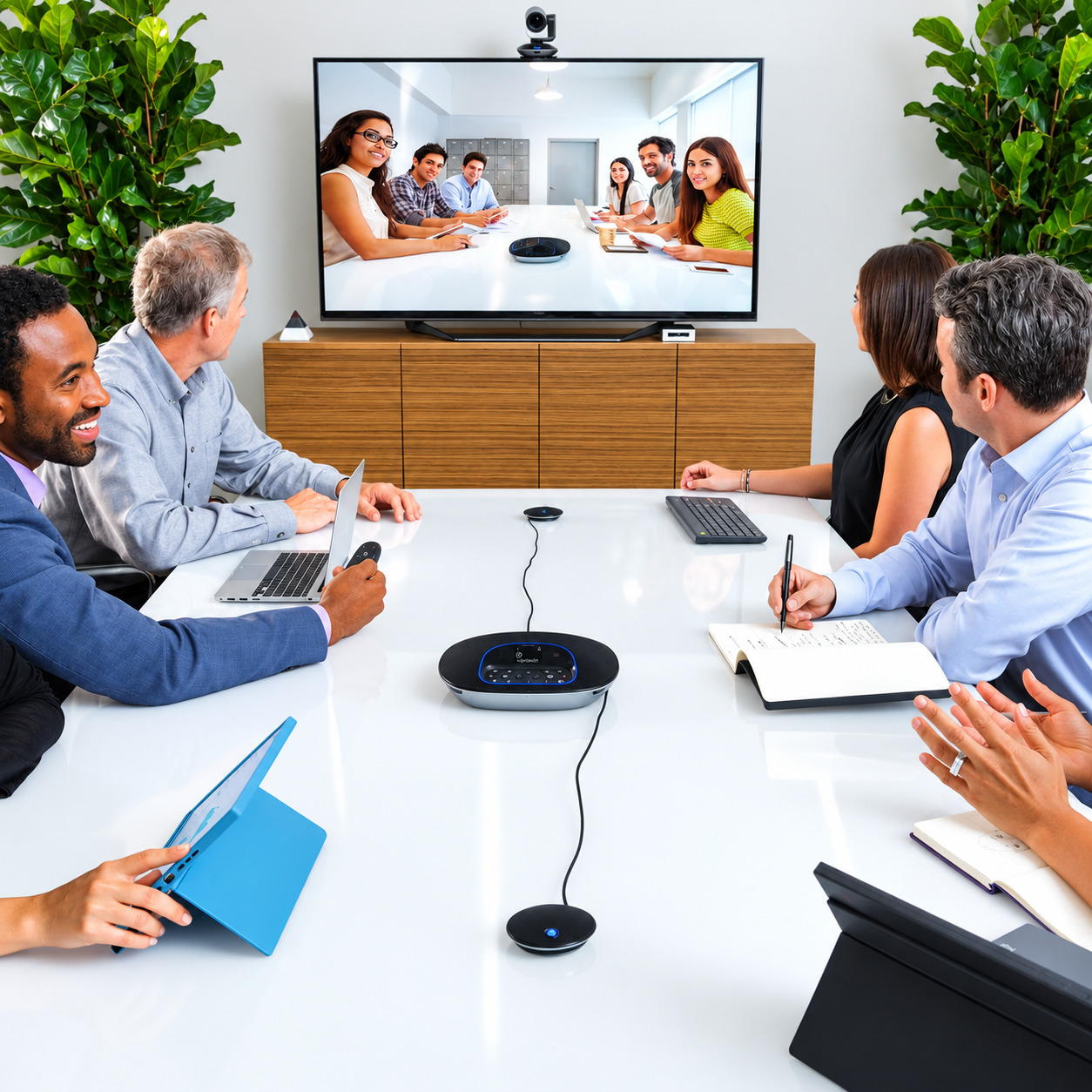
Logitech GROUP is a professional conference-room system designed for medium to large meeting spaces. It combines a motorised PTZ camera, speakerphone and microphones, allowing people in the room to participate in virtual meetings without relying on a basic laptop webcam and microphone.
Instead of placing a laptop at one end of a conference table and hoping its built-in camera captures everyone, GROUP is designed around the room itself.
The camera can pan, tilt and zoom, while the speakerphone and microphones are positioned to capture conversation from around the meeting table.
This makes the system useful for companies that regularly communicate with employees, customers, suppliers or partners in other locations.
Quick Answer
If your business needs a dedicated conference-room camera and audio solution rather than a basic webcam, Logitech GROUP is worth considering. It is particularly suited to medium and large rooms where camera coverage and microphone pickup matter.

What Makes Logitech GROUP Suitable for Meeting Rooms?
Logitech GROUP is designed specifically for mid-to-large meeting rooms, with a 90° diagonal field of view, 10x lossless HD zoom and microphones rated for up to a 6-metre pickup range. Optional expansion microphones can extend the stated pickup range to about 8.5 metres.
The biggest advantage is that the components work together as one conferencing setup.
For example, imagine a meeting room with eight people sitting around a table. A laptop webcam may capture only the people closest to it. GROUP can be positioned to provide a wider view of the room, while its speakerphone and microphones handle the audio.
That difference becomes important when meetings involve external clients or senior executives. Poor audio can make an otherwise professional organisation appear disorganised.
Key Features of Logitech GROUP
The key features of Logitech GROUP include Full HD 1080p video, 10x lossless HD zoom, motorised pan and tilt, a 90° diagonal field of view, full-duplex audio, acoustic echo cancellation, noise reduction and four omnidirectional beamforming microphones.
Here are the main specifications IT and procurement teams should know:
Feature | Logitech GROUP |
Video | Full HD 1080p at 30fps |
Camera | Motorised PTZ |
Zoom | 10x lossless HD zoom |
Field of view | 90° diagonal |
Microphones | Four omnidirectional beamforming microphones |
Standard microphone pickup | Up to 6 m |
Expansion microphone pickup | Up to 8.5 m |
Audio | Full-duplex |
Audio processing | Acoustic echo cancellation and noise reduction |
Connectivity | USB |
Wireless audio options | Bluetooth and NFC |
Camera presets | Five |
Warranty | 2-year limited hardware warranty |
Specifications are based on Logitech’s current product documentation.
Logitech GROUP Camera Performance
The Logitech GROUP camera records Full HD 1080p video at 30fps and provides a 90° diagonal field of view with 10x lossless HD zoom. Its motorised pan and tilt functions make it easier to frame people across a conference table.
The PTZ design is especially useful when different people need to be visible during a meeting.
For instance, an IT manager might want a wide shot of the entire room at the start of a presentation. During a discussion, the camera can be adjusted to focus more closely on a speaker.
GROUP also includes five camera presets. This can be useful when a company has recurring meeting arrangements and wants to return quickly to preferred camera positions.
Why PTZ Matters
PTZ means pan, tilt and zoom.
Rather than using a fixed webcam, a PTZ camera can change its viewing direction and magnification.
That matters in larger rooms because the camera does not have to rely on a single fixed composition.
Audio and Microphone Performance
Logitech GROUP uses a full-duplex speakerphone with acoustic echo cancellation and noise reduction, supported by four omnidirectional beamforming microphones. The standard microphone pickup range is listed at 6 metres, while expansion microphones can extend coverage to 8.5 metres.
Audio is arguably more important than video in many business meetings.
A participant might tolerate slightly lower video resolution. It is much harder to tolerate constantly asking someone to repeat themselves.
GROUP addresses this through its dedicated speakerphone and microphone system.
The microphones are designed to pick up voices around the room, while echo cancellation helps prevent the meeting from becoming a cycle of repeated or distorted audio.
What About Noisy Offices?
Noise reduction can help improve the meeting experience, but it should not be treated as a substitute for good room design.
A conference room located beside a busy reception area will still benefit from practical measures such as closing doors, reducing unnecessary background noise and positioning the microphones correctly.
The technology works best when the room itself is reasonably controlled.
Connectivity and Platform Compatibility
Logitech GROUP uses USB connectivity for connection to a computer and is designed to work with major video conferencing and communication applications that support USB cameras. Logitech lists compatibility with platforms including Microsoft Teams, Zoom, Cisco Jabber and other supported conferencing applications.
Promallshop also lists compatibility with Zoom, Microsoft Teams, Webex and Google Meet for its Logitech GROUP product listing.
This is important for organisations that do not want to redesign their entire communication workflow around a single platform.
The system can function as the room’s camera and audio hardware while the meeting application runs on the connected computer.
USB vs Dedicated Room Appliance
A USB-based conferencing system can be attractive when an organisation wants flexibility.
A business may already have computers running Windows or macOS and use several meeting platforms. In that situation, connecting the conferencing hardware to the meeting computer can be straightforward.
Dedicated room appliances, meanwhile, are built around specific room-management experiences. Modern solutions such as Zoom Rooms offer purpose-built room hardware and management options.
The right choice depends on how the organisation operates its meeting rooms.
Who Should Use Logitech GROUP?
Logitech GROUP is best suited to organisations that need a dedicated video conferencing setup for medium to large meeting rooms, especially businesses holding regular hybrid meetings, presentations, training sessions and client calls.
It can be a good fit for:
- Corporate offices
- Boardrooms
- Training rooms
- Consulting firms
- Financial institutions
- Government organisations
- Educational institutions
- Professional service companies
- Distributed teams
- Businesses with regular client meetings
Example: A Growing Nigerian Business
Imagine a Lagos-based company with teams in Lagos, Abuja and Accra.
Its management team meets every Monday with remote staff. Previously, everyone gathered around a laptop, forcing people at the far end of the table to lean forward whenever they wanted to speak.
A dedicated conference-room system changes the arrangement.
The camera covers the room more effectively, while dedicated microphones and speakers make conversation easier to hear.
The improvement is not simply better technology. It is a better meeting workflow.
How to Set Up Logitech GROUP
Setting up Logitech GROUP involves positioning the camera and speakerphone, connecting the components through the central hub, connecting the hub to the meeting computer by USB and configuring the preferred conferencing application.
A practical installation process looks like this:
- Choose the camera position.
Place the camera where it has a clear view of the participants. - Position the speakerphone.
Keep it close enough to participants for effective microphone pickup. - Connect the hub.
The central hub connects and powers the system’s major components. - Connect the USB cable.
Connect the system to the meeting computer. - Open your conferencing platform.
Select Logitech GROUP as the camera, microphone and speaker device where required. - Test the room.
Run a test meeting before the first important client or executive call. - Create camera presets.
Save useful positions for common meeting arrangements.
Installation Tip
Do not complete installation based only on where the equipment looks neat.
Sit in different positions around the table and test the actual participant experience. A clean installation is useful, but microphone coverage and camera framing should come first.
Logitech GROUP vs Other Conference Room Solutions
Logitech GROUP remains attractive when an organisation wants a modular USB conference-room system with a PTZ camera, dedicated speakerphone and expandable microphone coverage. Newer all-in-one room systems may be preferable when a business wants 4K video, integrated room computing or newer AI-driven features.
Requirement | Logitech GROUP | Modern all-in-one room system |
Full HD video | Yes | Usually yes |
4K video | No | Available on many models |
PTZ camera | Yes | Depends on model |
Dedicated speakerphone | Yes | Usually integrated |
Expansion microphones | Yes | Depends on model |
USB computer-based setup | Yes | Depends on model |
Best fit | Mid/large rooms | Varies by room and platform |
Room appliance experience | No | Available on many systems |
For example, Logitech’s current product range includes Rally solutions for more advanced meeting-room requirements, while Zoom’s current recommended hardware ecosystem includes Logitech, Yealink, Poly, Neat and other manufacturers.
That means GROUP should be evaluated according to the room’s actual requirements rather than simply assuming the newest product is automatically the best option.
Pros and Cons of Logitech GROUP
The main strengths of Logitech GROUP are its PTZ camera, 1080p video, 10x lossless zoom, dedicated speakerphone, microphone coverage and USB flexibility. Its main limitation is that it is a Full HD generation of conference hardware, so businesses looking specifically for 4K video or newer all-in-one room experiences may prefer a newer system.
Pros
- Full HD 1080p video
- 10x lossless HD zoom
- Motorised pan and tilt
- 90° diagonal field of view
- Dedicated speakerphone
- Acoustic echo cancellation
- Noise reduction
- Four omnidirectional microphones
- Optional expansion microphones
- USB plug-and-play connectivity
- Bluetooth and NFC support
- Five camera presets
Cons
- Video resolution is limited to Full HD rather than 4K
- It requires a connected computer for a typical USB setup
- Newer room systems can offer more advanced integrated features
- Larger rooms may require expansion microphones
How to Choose the Right Video Conferencing System
The right video conferencing system should be selected according to room size, participant numbers, camera coverage, microphone pickup, conferencing platforms, connectivity, installation requirements and future expansion plans.
Before purchasing, IT and procurement teams should work through these questions:
1. How large is the room?
A huddle room needs different equipment from a boardroom.
Do not choose equipment based purely on the number of people. Room shape and seating arrangement also influence camera and microphone performance.
2. How far are participants from the microphones?
Microphone pickup is one of the most commonly overlooked factors.
If participants at the far end of a table cannot be heard clearly, the meeting experience suffers regardless of camera quality.
3. Which platforms does your organisation use?
Check whether your preferred solution works with Zoom, Microsoft Teams, Google Meet, Webex or other required applications.
4. Do you need 4K?
4K can be valuable for certain use cases, but not every conference room requires it.
If the main priority is reliable communication rather than ultra-high-resolution imagery, Full HD may still be adequate.
5. What happens when the business grows?
Procurement teams should think beyond today’s meeting room.
Expansion microphones, additional displays, room controllers and other accessories may become useful as the organisation expands.
Best Practices for Better Meeting Rooms
A high-quality video conferencing system performs best when it is paired with good room design, reliable connectivity, suitable lighting, proper equipment placement and routine testing.
Use these practices:
- Position the camera at an appropriate eye-level angle.
- Avoid placing bright windows directly behind participants.
- Keep microphones unobstructed.
- Reduce unnecessary background noise.
- Use a reliable network connection.
- Test audio before important meetings.
- Keep conferencing software updated.
- Label cables during installation.
- Keep the room layout consistent where possible.
- Test the system from the remote participant’s perspective.
Microsoft’s Teams Rooms certification programme also shows why businesses should look beyond individual specifications and evaluate the complete audio, video, user experience and security environment.
Common Mistakes When Buying Conference Room Equipment
The most common mistake is choosing a camera based only on resolution. A successful conference room requires balanced video, microphone coverage, speaker performance, platform compatibility and room design.
Here are mistakes worth avoiding:
Buying for megapixels alone
A 4K camera does not automatically produce a better meeting if participants cannot be heard.
Ignoring room acoustics
Hard surfaces can create reflections and echo. Equipment should be evaluated alongside the room itself.
Forgetting future expansion
A company may start with six participants and later need a larger setup.
Choosing incompatible equipment
Always verify compatibility with the conferencing platform and computer environment before purchase.
Skipping the test meeting
A system can appear perfect during installation and still perform poorly when ten people are actually sitting around the table.
The Future of Business Video Conferencing
Business video conferencing is moving toward smarter, more integrated meeting rooms, with AI-assisted framing, room management, intelligent audio processing and platform-certified hardware becoming increasingly common.
Modern platforms are already building broader room ecosystems rather than treating the camera as an isolated device.
Zoom, for example, currently supports a broad range of room hardware and certified devices, while Microsoft maintains certification requirements covering audio, video, security, accessibility and the Teams experience.
For businesses, this means the purchasing conversation is changing.
The question is no longer simply, “Which conference camera should we buy?”
It is increasingly:
“What meeting-room experience do we want our employees, customers and partners to have?”
That shift matters for IT managers and procurement teams planning technology investments for the next several years.
Conclusion
A professional meeting room should make communication easier, not create another technical problem for employees to solve.
The Logitech GROUP Video Conferencing System offers a straightforward approach by combining a PTZ camera, dedicated speakerphone and multiple microphones in one conference-room solution. Its Full HD video, 10x lossless zoom, 90° field of view and audio processing make it particularly relevant for businesses that need reliable hybrid meetings in medium to large rooms.
It is not necessarily the newest or most feature-heavy conferencing platform available today. Businesses looking for 4K video, integrated room computing or newer AI-powered features may want to compare it with newer solutions.
However, if your priority is a practical, professional and flexible conference-room system, Logitech GROUP remains a solution worth evaluating.
For businesses in Nigeria and West Africa, the key is to match the equipment to the room, meeting style and long-term collaboration requirements rather than buying based on specifications alone.
FAQs
Logitech GROUP is a professional conference-room system combining a Full HD PTZ camera, speakerphone and microphones for medium to large meeting rooms.
Yes. Its dedicated camera, speakerphone and microphone system make it suitable for corporate meetings, presentations, training and hybrid collaboration.
Yes. The camera supports Full HD 1080p video at 30fps.
Yes. It has 10x lossless HD zoom.
The standard microphone pickup range is listed at 6 metres. With expansion microphones, Logitech lists a pickup range of approximately 8.5 metres.